Sculpt: A Presentation Template Designed for Modern Storytelling
You’ve been there: staring at a blank slide, the clock ticking, needing to communicate an idea, a project, or your entire business with clarity and impact. Whether you're pitching to investors, presenting quarterly results to your team, or showcasing your creative portfolio, the foundation of that communication is your presentation deck. The Presentation Template - Sculpt is built to be that foundation—not a rigid set of slides, but a flexible toolkit designed to help you sculpt your message into a compelling narrative.
What Is the Sculpt Presentation Template?
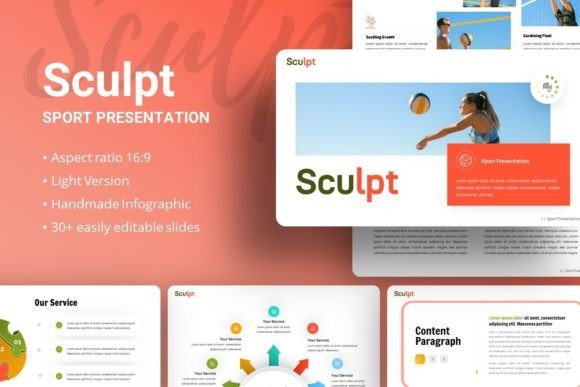
In essence, Sculpt is a professionally designed PowerPoint template. But thinking of it merely as a template misses its purpose. It’s a starting point engineered to save you time and elevate your visual communication. With 35 unique slides, handcrafted infographics, and pixel-perfect illustrations, it provides a cohesive visual language. The key is that this language is fully adaptable. Every element is resizable and editable, colors can be changed to match your brand, and placeholder images allow you to simply drag and drop your own photos. It comes as a .PPTX file with clear documentation, using the clean, modern fonts Francois One and Manrope. It’s designed for the real-world process of building a presentation, where you need structure but also need the freedom to make it yours.
The Real-World Moments Where Sculpt Steps In
A powerful template isn’t about generic uses; it’s about fitting seamlessly into the specific pressures and opportunities of your day. Let’s look at where Sculpt becomes relevant.
For the Entrepreneur and Startup Founder
Your pitch deck isn’t just slides; it’s your story compressed into fifteen minutes. It needs to convey vision, data, and credibility simultaneously. Sculpt’s master slide foundation ensures a consistent, professional look from the first slide to the last, avoiding the jarring inconsistency of cobbled-together slides. Its handcrafted infographics are invaluable here—you can visually represent your market growth, funding roadmap, or user adoption without spending hours with complex chart tools. You're not just showing numbers; you're showing a trajectory. The clean, bold typography helps key statements about your unique value proposition stand out with authority, holding a potential investor’s attention.
For the Creative Agency and Freelance Professional
Presenting a portfolio or a campaign concept is about selling aesthetic judgment as much as selling results. The template’s design is modern and minimalist, providing a gallery-like frame for your work. The picture placeholders are a practical boon; you can quickly swap in client project images, mock-ups, or photography. Using Sculpt, you signal to clients that you understand presentation as part of the creative product itself. A designer using this template for a brand identity pitch can seamlessly integrate the proposed logos and color palettes into the template’s own editable graphics, creating a immersive preview of their work.
For Corporate Teams and Business Managers
Internal presentations—strategy updates, onboarding sessions, annual reviews—often suffer from visual fatigue. Sculpt offers an escape from the standard corporate template. Its easy customization means the internal communications team can adapt it for the entire organization, using master slides to ensure brand compliance while allowing individual departments to tailor sections. A project manager presenting a post-launch analysis can use the resizable illustration assets to build a custom flowchart of the process, making complex information digestible for stakeholders across departments.
For Educators, Bloggers, and Content Creators
Presentations extend beyond the boardroom. An educator creating a course module, a blogger distilling a research post into a webinar, or a hobbyist sharing a process tutorial—all need to structure information clearly. Sculpt’s logical slide progression helps organize content from introduction to deep-dive to summary. The template’s reliance on fonts like Manrope, known for readability on screens, is a subtle but important feature for audience engagement during longer, educational sessions. You’re building a learning experience, not just a slide deck.
Considering Sculpt Before You Download
Any tool should be evaluated against your actual needs and workflow. Here are practical considerations.
First, assess your comfort with PowerPoint. Sculpt is designed for ease, but it leverages master slides and vector graphics. If you’re familiar with basic PowerPoint functions like changing colors, editing text, and using placeholder images, you’ll harness its full value quickly. The included documentation file is there to bridge any gaps.
Second, think about brand alignment. The template’s default aesthetic is bold and contemporary. If your personal or company brand requires a very specific, perhaps softer or more traditional look, remember that while colors and fonts are editable, the underlying geometric structure of the illustrations and layouts carries a certain modern character. It’s flexible, but it has a starting personality.
Third, understand the image sources. The demo preview uses images from Unsplash, Pixabay, and Pexels to show possibilities, but these are not included in the download. This is actually a benefit—it pushes you to integrate your own unique imagery, making the final presentation truly original. It means you need to have your own photos or know how to source high-quality stock images, which is best practice for any professional presentation.
How Features Translate into Practical Outcomes
Listing features is less helpful than seeing their effect on your work.
- 35 Slides for Each Template: This isn’t about volume, but about coverage. It means you have slides purpose-built for team introductions, data comparisons, timelines, quote call-outs, and final calls to action. You won’t hit a point where you need a specific slide type and have to Frankenstein it from something else.
- Easy Customizable Contents & Resizable Graphics: The outcome here is speed and cohesion. When a last-minute request comes to change the company accent color throughout the deck, you can do it globally via master slides in minutes, not hours. When you need to make an icon larger to emphasize a point, you can simply drag its corner without it blurring.
- Handcrafted Infographics: The real benefit is persuasive clarity. You’re turning abstract concepts like “growth” or “process” into intuitive visuals. An investor sees your projected market penetration not as a spreadsheet cell, but as a filling meter; a client sees your service pipeline as a clean journey, not a bulleted list.
- Picture Placeholder, Drag and Drop: This directly tackles the most tedious part of deck creation—image formatting. The outcome is that you spend your time selecting the right image, not cropping, aligning, and fitting it into the slide.
In the end, the Presentation Template - Sculpt is for anyone who needs to turn ideas into influence. It recognizes that a presentation is a story told visually, and it provides the structured, adaptable components to tell that story well. It saves you from the blank page paralysis and elevates you from the default template mundanity, putting your energy where it belongs: on the content of your message, not the struggle of its container. Whether you are launching a startup, winning a client, teaching a class, or reporting to your team, it offers a professional starting point from which you can sculpt exactly what you need to say.