The LazyIce Sport Presentation Template: A Modern Design Toolkit
When you need to deliver a presentation that stands out, finding the right starting point can be the biggest hurdle. You want a design that looks professional and engaging, but you also need flexibility to tell your unique story. This is where the LazyIce Sport Presentation template comes into play. It’s not just a set of slides; it’s a comprehensive, customizable design system built within Microsoft PowerPoint, designed to save you time while elevating your visual communication.
What Is LazyIce Sport Presentation?
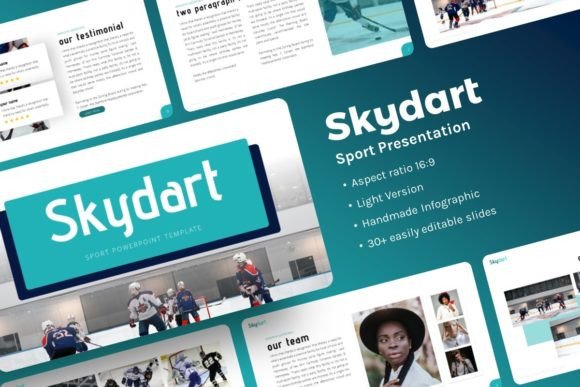
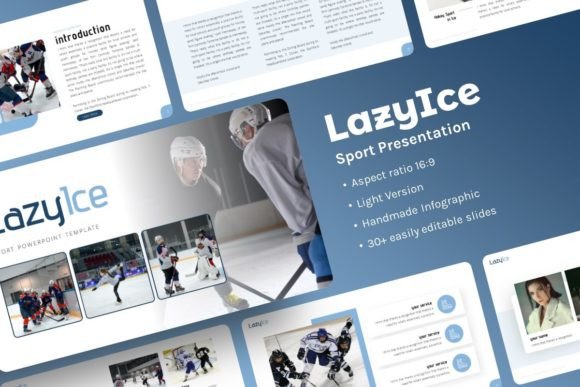
In simple terms, LazyIce Sport Presentation is a pre-designed PowerPoint template. It provides a complete foundation of 30 slides, all styled with a cohesive, modern aesthetic that carries a clean and dynamic vibe. The "Sport" element in its name suggests a theme of energy, motion, and achievement, which can be broadly applied beyond just athletic topics. The true value lies in its structure: it’s built using PowerPoint’s Master Slides feature. This means you can change core design elements like fonts, colors, or backgrounds in one central location, and those changes automatically apply across all your slides, ensuring consistency and saving immense time.
The Core Features and Practical Value
Understanding the specific features reveals why this template is more than a static design.
- 30 Ready-to-Use Slides: A generous collection covering titles, content layouts, data displays, and conclusions.
- Handcrafted Infographics: Custom charts, diagrams, and process flows are included as editable PowerPoint objects, not just images.
- Pixel-Perfect Illustrations: All graphic elements are crisp, scalable, and fully editable within PowerPoint.
- Drag-and-Drop Picture Placeholders: Simplifying image insertion—you drag your photo into the placeholder frame, and it automatically fits.
- Easy Customizable Contents: Every text box and graphic can be altered. Colors, fonts, and sizes are all under your control.
- Resizable and Editable Graphics: No need for external design software; adjustments happen directly in your presentation file.
The included files are straightforward: the main PowerPoint .PPTX file, a documentation guide to help you start, and a set of vector icons for further embellishment. The template uses the clean, web-safe fonts Advent Pro and Open Sans. It’s important to note that the stunning demo images are sourced from free libraries like Unsplash, Pixabay, and Pexels—they are for preview only. You’ll replace them with your own photos, but the template guides you to similar, high-quality resources.
Who Needs This Template and Why?
The versatility of LazyIce Sport Presentation is its strongest appeal. It supports a wide range of users and goals.
For Professionals and Businesses
If you’re crafting a company profile, a corporate report, or a pitch deck for investors, a polished presentation builds credibility. This template offers a professional baseline. Entrepreneurs and startup teams can use it to create a compelling pitch deck that looks established and intentional, helping to convey vision and data clearly. Creative agencies can adapt it for client proposals or portfolio showcases, where visual appeal is paramount.
For Creators and Freelancers
Individuals building a personal portfolio—whether for photography, design, writing, or consulting—benefit immensely. The template provides a structured, attractive way to present your work and services without requiring deep design expertise. Bloggers or marketers creating educational webinars or content summaries can produce slides that are both informative and visually engaging for their audience.
For Educators and Casual Users
Teachers, trainers, or hobbyists leading a workshop or community talk need clear, effective slides. The drag-and-drop functionality and easy text editing make the LazyIce Sport Presentation accessible for beginners. Even a casual user preparing a family presentation or a club update can achieve a result that looks thoughtfully prepared.
Ultimately, it solves common problems: lack of design time, uncertainty about visual cohesion, and the desire to move beyond PowerPoint’s default, often bland, templates. It supports the goal of communicating your message with confidence and style.
Realistic Applications and Use Cases
Imagine a small business owner preparing for a local networking event. She uses the LazyIce slides to quickly build a 10-slide overview of her services. She uses the infographic slides to show her client growth process, drops her logo into the editable header, and inserts her own team photos into the picture placeholders. The result is a tailored, professional deck ready in an afternoon.
A fitness coach creating an online course module uses the template. The sport-inspired energy of the design fits his topic naturally. He utilizes the comparison slides to highlight different workout benefits and the data slides to present client success statistics. The master slides feature lets him set a consistent color scheme that matches his brand.
A freelancer designer needs to submit a project proposal to a potential client. He customizes the portfolio-focused slides within LazyIce Sport Presentation to showcase his previous work. He replaces the demo images with screenshots of his designs, edits the text to detail his approach, and uses the clean typography to keep the focus on his content. The client receives a proposal that feels both personal and highly professional.
Important Considerations Before You Begin
While the LazyIce Sport Presentation template is designed for ease, a few practical points will help you succeed.
First, you need a version of Microsoft PowerPoint that supports .PPTX files. The template operates within that environment. Second, understand that customization is expected. You will be replacing text, images, and possibly colors. The documentation file is there to guide you, so review it. Third, the included fonts (Advent Pro, Open Sans) are freely available. If you use them, your presentation will look exactly as designed. If you choose to change fonts, ensure they are installed on your system for proper display.
The template gives you structure and high-quality design elements, but your content is what makes it powerful. Gather your key messages, data, and images beforehand. Use the drag-and-drop picture placeholder feature to efficiently populate the visual sections. Remember, the master slides are your control center—experimenting with changing the theme color there can transform the look of all slides instantly, allowing you to match your brand perfectly.
A Tool for Modern Communication
The LazyIce Sport Presentation template bridges the gap between needing a great design and having the time or skill to create one from scratch. Its built-in flexibility through Master Slides, editable graphics, and intuitive placeholders makes it a practical toolkit rather than a rigid template. Whether your context is business, creative, educational, or personal, it provides a reliable foundation. By focusing on your unique content and leveraging the template’s smart design system, you can produce presentations that are not only visually cohesive but also truly effective in conveying your ideas. It turns the often-daunting task of slide creation into a more streamlined, confident, and creative process.